On the Subject of Wires
You handle 4-wire and 6-wire modules. For 3 or 5 wires, tell the defuser to ask ALPHA.
A wire module has 3-6 wires. Only one correct wire must be cut. Wire ordering: first = top.
4 Wires
- If there is more than one red wire and the last digit of the serial number is odd, cut the last red wire.
- Otherwise, if the last wire is yellow and there are no red wires, cut the first wire.
- Otherwise, if there is exactly one blue wire, cut the first wire.
- Otherwise, if there is more than one yellow wire, cut the last wire.
- Otherwise, cut the second wire.
6 Wires
- If there are no yellow wires and the last digit of the serial number is odd, cut the third wire.
- Otherwise, if there is exactly one yellow wire and more than one white wire, cut the fourth wire.
- Otherwise, if there are no red wires, cut the last wire.
- Otherwise, cut the fourth wire.
On the Subject of The Button
ALPHA decides hold vs press. If the defuser is holding the button, they tell you the colored strip color and you give the release timing.
The defuser was told to HOLD by ALPHA. A colored strip appeared on the right side of the module.
Releasing a Held Button
Based on the strip color, release the button when the countdown timer has a specific digit in any position:
| Strip Color | Release When Timer Has |
|---|---|
| Blue | Release when timer has a 4 in any position |
| White | Release when timer has a 1 in any position |
| Yellow | Release when timer has a 5 in any position |
| Any other color | Release when timer has a 1 in any position |
On the Subject of Keypads
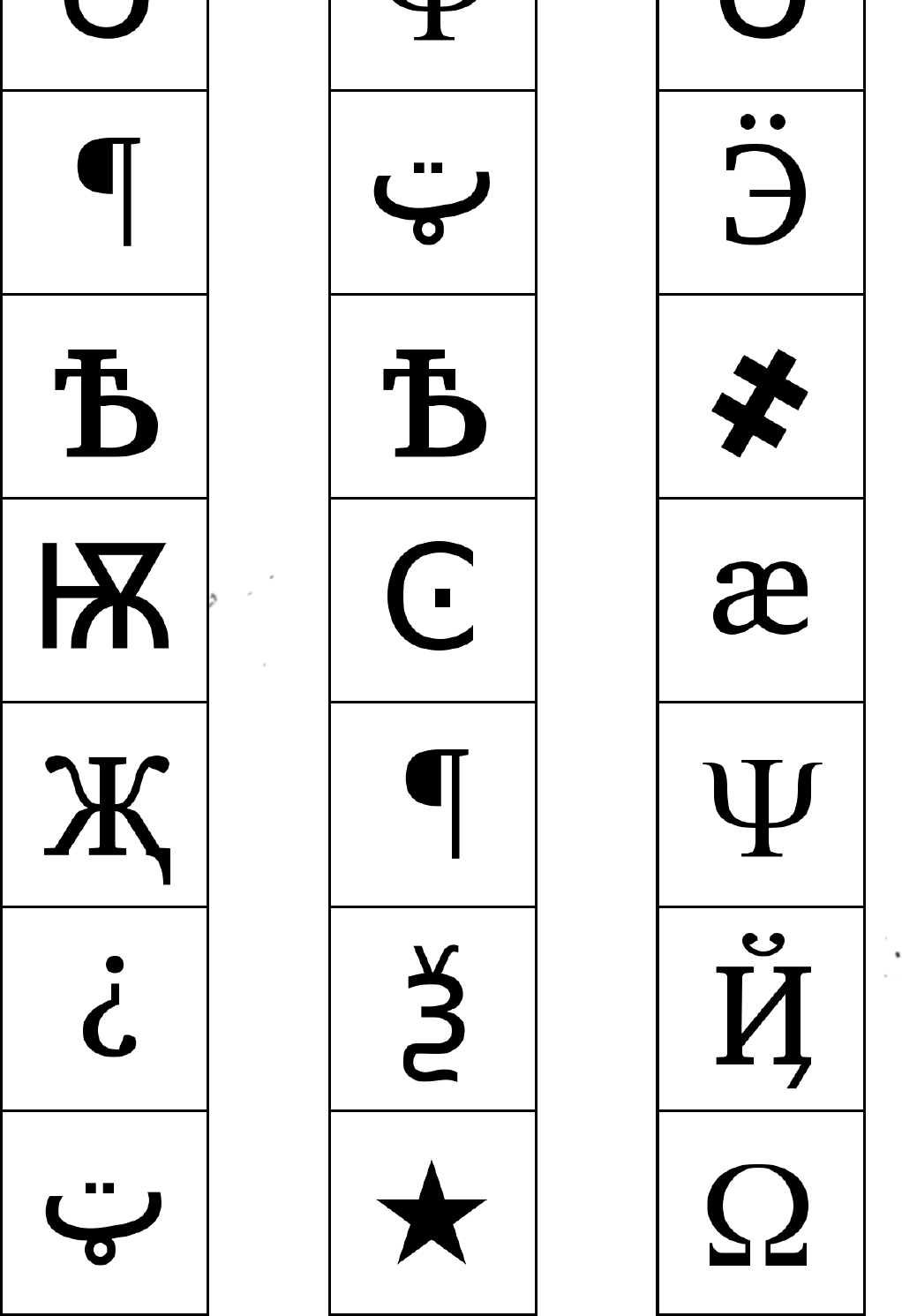
You have columns 4, 5, 6. If ALPHA's columns (1-3) didn't match, the defuser asks you.
Only one column has all four symbols from the keypad. Press them in top-to-bottom order within that column.
On the Subject of Simon Says
You handle Simon Says when the serial number does NOT contain a vowel. Has a vowel → ask ALPHA.
A colored button flashes. Press the corresponding mapped color. The sequence grows by one each round.
Serial Number Does NOT Contain a Vowel
| Red Flash | Blue Flash | Green Flash | Yellow Flash | |
|---|---|---|---|---|
| No Strikes | Blue | Yellow | Green | Red |
| 1 Strike | Red | Blue | Yellow | Green |
| 2 Strikes | Yellow | Green | Blue | Red |
On the Subject of Who's on First
You handle Step 2: ALPHA told the defuser which button to read. The defuser tells you that label. You find the first word from the list that also appears as a button on the module.
Step 2: Using the label the defuser reads, find it in the left column. Read through the list left to right — press the first button from the list that appears on the module.
| Label | Priority List (press first match that exists on the module) |
|---|---|
| "READY" | YES, OKAY, WHAT, MIDDLE, LEFT, PRESS, RIGHT, BLANK, READY, NO, FIRST, UHHH, NOTHING, WAIT |
| "FIRST" | LEFT, OKAY, YES, MIDDLE, NO, RIGHT, NOTHING, UHHH, WAIT, READY, BLANK, WHAT, PRESS, FIRST |
| "NO" | BLANK, UHHH, WAIT, FIRST, WHAT, READY, RIGHT, YES, NOTHING, LEFT, PRESS, OKAY, NO, MIDDLE |
| "BLANK" | WAIT, RIGHT, OKAY, MIDDLE, BLANK, PRESS, READY, NOTHING, NO, WHAT, LEFT, UHHH, YES, FIRST |
| "NOTHING" | UHHH, RIGHT, OKAY, MIDDLE, YES, BLANK, NO, PRESS, LEFT, WHAT, WAIT, FIRST, NOTHING, READY |
| "YES" | OKAY, RIGHT, UHHH, MIDDLE, FIRST, WHAT, PRESS, READY, NOTHING, YES, LEFT, BLANK, NO, WAIT |
| "WHAT" | UHHH, WHAT, LEFT, NOTHING, READY, BLANK, MIDDLE, NO, OKAY, FIRST, WAIT, YES, PRESS, RIGHT |
| "UHHH" | READY, NOTHING, LEFT, WHAT, OKAY, YES, RIGHT, NO, PRESS, BLANK, UHHH, MIDDLE, WAIT, FIRST |
| "LEFT" | RIGHT, LEFT, FIRST, NO, MIDDLE, YES, BLANK, WHAT, UHHH, WAIT, PRESS, READY, OKAY, NOTHING |
| "RIGHT" | YES, NOTHING, READY, PRESS, NO, WAIT, WHAT, RIGHT, MIDDLE, LEFT, UHHH, BLANK, OKAY, FIRST |
| "MIDDLE" | BLANK, READY, OKAY, WHAT, NOTHING, PRESS, NO, WAIT, LEFT, MIDDLE, RIGHT, FIRST, UHHH, YES |
| "OKAY" | MIDDLE, NO, FIRST, YES, UHHH, NOTHING, WAIT, OKAY, LEFT, READY, BLANK, PRESS, WHAT, RIGHT |
| "WAIT" | UHHH, NO, BLANK, OKAY, YES, LEFT, FIRST, PRESS, WHAT, WAIT, NOTHING, READY, RIGHT, MIDDLE |
| "PRESS" | RIGHT, MIDDLE, YES, READY, PRESS, OKAY, NOTHING, UHHH, BLANK, LEFT, FIRST, WHAT, NO, WAIT |
| "YOU" | SURE, YOU ARE, YOUR, YOU'RE, NEXT, UH HUH, UR, HOLD, WHAT?, YOU, UH UH, LIKE, DONE, U |
| "YOU ARE" | YOUR, NEXT, LIKE, UH HUH, WHAT?, DONE, UH UH, HOLD, YOU, U, YOU'RE, SURE, UR, YOU ARE |
| "YOUR" | UH UH, YOU ARE, UH HUH, YOUR, NEXT, UR, SURE, U, YOU'RE, YOU, WHAT?, HOLD, LIKE, DONE |
| "YOU'RE" | YOU, YOU'RE, UR, NEXT, UH UH, YOU ARE, U, YOUR, WHAT?, UH HUH, SURE, DONE, LIKE, HOLD |
| "UR" | DONE, U, UR, UH HUH, WHAT?, SURE, YOUR, HOLD, YOU'RE, LIKE, NEXT, UH UH, YOU ARE, YOU |
| "U" | UH HUH, SURE, NEXT, WHAT?, YOU'RE, UR, UH UH, DONE, U, YOU, LIKE, HOLD, YOU ARE, YOUR |
| "UH HUH" | UH HUH, YOUR, YOU ARE, YOU, DONE, HOLD, UH UH, NEXT, SURE, LIKE, YOU'RE, UR, U, WHAT? |
| "UH UH" | UR, U, YOU ARE, YOU'RE, NEXT, UH UH, DONE, YOU, UH HUH, LIKE, YOUR, SURE, HOLD, WHAT? |
| "WHAT?" | YOU, HOLD, YOU'RE, YOUR, U, DONE, UH UH, LIKE, YOU ARE, UH HUH, UR, NEXT, WHAT?, SURE |
| "DONE" | SURE, UH HUH, NEXT, WHAT?, YOUR, UR, YOU'RE, HOLD, LIKE, YOU, U, YOU ARE, UH UH, DONE |
| "NEXT" | WHAT?, UH HUH, UH UH, YOUR, HOLD, SURE, NEXT, LIKE, DONE, YOU ARE, UR, YOU'RE, U, YOU |
| "HOLD" | YOU ARE, U, DONE, UH UH, YOU, UR, SURE, WHAT?, YOU'RE, NEXT, HOLD, UH HUH, YOUR, LIKE |
| "SURE" | YOU ARE, DONE, LIKE, YOU'RE, YOU, HOLD, UH HUH, UR, SURE, U, WHAT?, NEXT, YOUR, UH UH |
| "LIKE" | YOU'RE, NEXT, U, UR, HOLD, DONE, UH UH, WHAT?, UH HUH, YOU, LIKE, SURE, YOU ARE, YOUR |
On the Subject of Memory
You handle stages 2 and 4. ALPHA handles stages 1, 3, 5. Both of you must track positions and labels from ALL stages.
Press the correct button each stage. Buttons are positioned left-to-right (1st, 2nd, 3rd, 4th).
Stage 2
- Display is 1: press the button labeled "4".
- Display is 2: press the button in the same position as you pressed in stage 1.
- Display is 3: press the button in the 1st position.
- Display is 4: press the button in the same position as you pressed in stage 1.
Stage 4
- Display is 1: press the button in the same position as you pressed in stage 1.
- Display is 2: press the button in the 1st position.
- Display is 3: press the button in the same position as you pressed in stage 2.
- Display is 4: press the button in the same position as you pressed in stage 2.
On the Subject of Morse Code
Both you and ALPHA have the Morse alphabet. You have frequency lookups for words starting M-Z. Words A-L → ask ALPHA.
Decode the flashing light using Morse code. Short flash = dot, long flash = dash. Long gap between letters, very long gap = word repeats.
Morse Alphabet
Frequency Table (Words M-Z)
| Word | Frequency |
|---|---|
| shell | 3.505 MHz |
| slick | 3.522 MHz |
| steak | 3.582 MHz |
| sting | 3.592 MHz |
| strobe | 3.545 MHz |
| trick | 3.532 MHz |
| vector | 3.595 MHz |
On the Subject of Complicated Wires
You handle wires where the LED above is ON. LED is OFF → ask ALPHA.
For each wire, check: does it have red coloring? Blue coloring? A star below? Is the LED above lit? Then look up the action.
LED is ON — Lookup Table
| Red? | Blue? | Star? | Action |
|---|---|---|---|
| No | No | No | D — Do NOT cut |
| Yes | No | No | B — Cut if bomb has 2+ batteries |
| No | Yes | No | P — Cut if bomb has a parallel port |
| No | No | Yes | B — Cut if bomb has 2+ batteries |
| Yes | Yes | No | S — Cut if serial last digit is even |
| Yes | No | Yes | B — Cut if bomb has 2+ batteries |
| No | Yes | Yes | P — Cut if bomb has a parallel port |
| Yes | Yes | Yes | D — Do NOT cut |
On the Subject of Wire Sequences
You handle BLUE and BLACK wires. Red wires → ask ALPHA.
Count each color's occurrences cumulatively across all panels. Cut the wire if it connects to the listed letter(s).
Blue Wire Occurrences
| Occurrence | Cut if Connected to |
|---|---|
| 1st blue | B |
| 2nd blue | A or C |
| 3rd blue | B |
| 4th blue | A |
| 5th blue | B |
| 6th blue | B or C |
| 7th blue | C |
| 8th blue | A or C |
| 9th blue | A |
Black Wire Occurrences
| Occurrence | Cut if Connected to |
|---|---|
| 1st black | A, B, or C |
| 2nd black | A or C |
| 3rd black | B |
| 4th black | A or C |
| 5th black | B |
| 6th black | B or C |
| 7th black | A or B |
| 8th black | C |
| 9th black | C |
On the Subject of Mazes
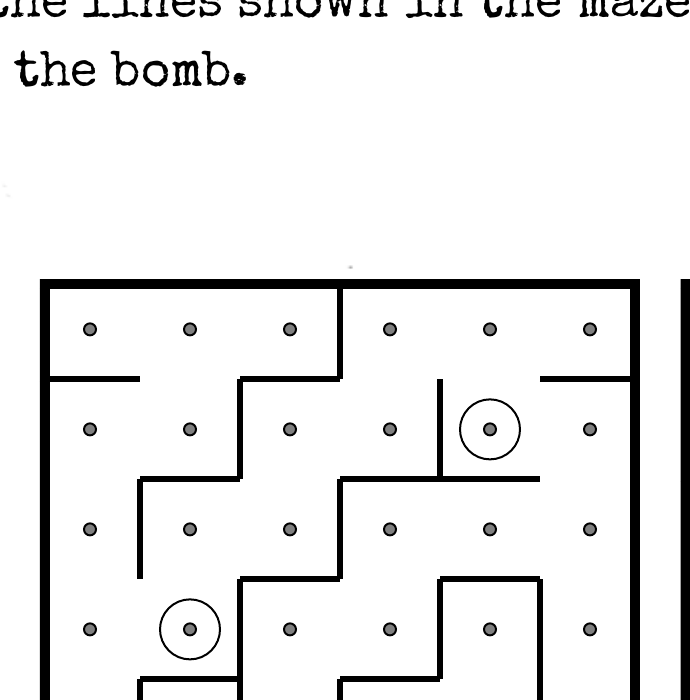
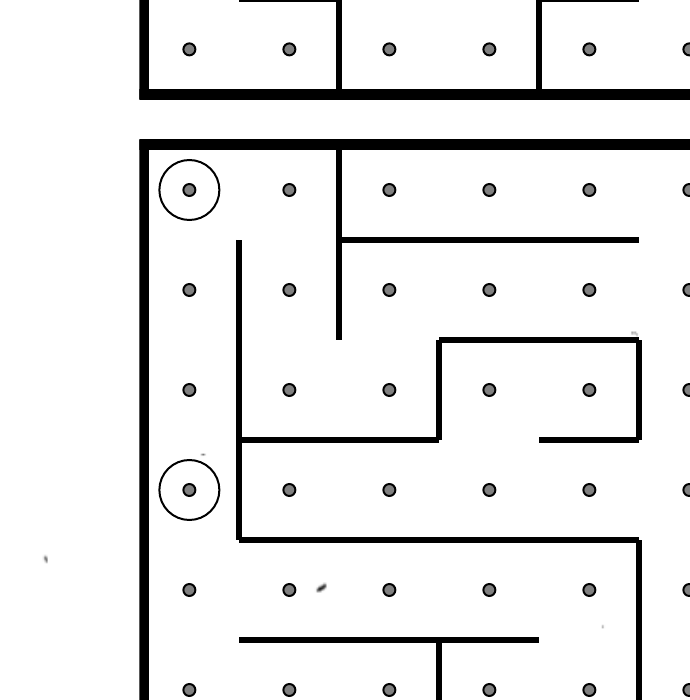
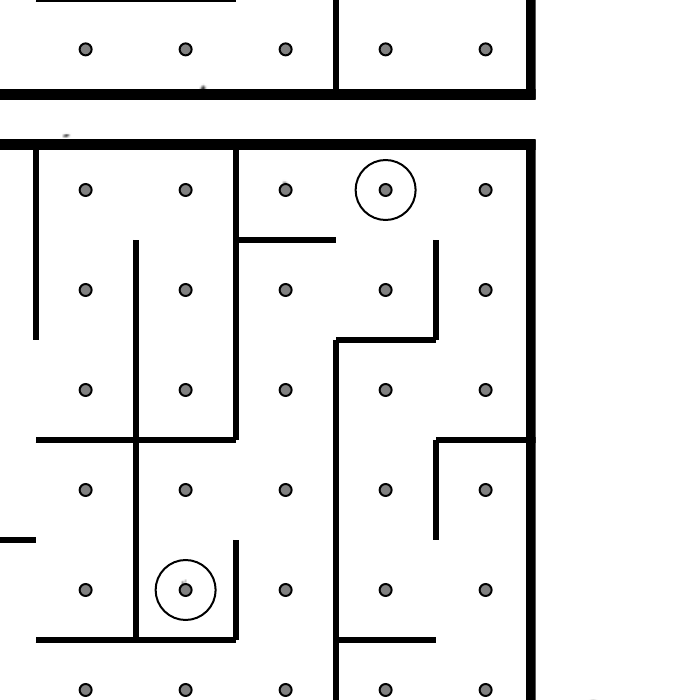
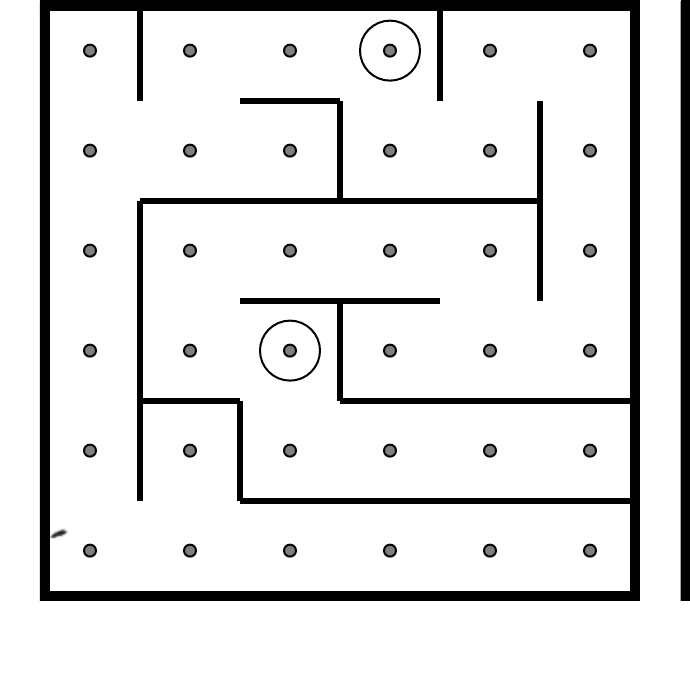
You have mazes 2, 4, 6, 8. If the defuser's green circles don't match any of yours, tell them to ask ALPHA.
Find the maze matching the two green circle markers. Guide the defuser from the white square to the red triangle using arrow keys. Do not cross invisible walls.
On the Subject of Passwords
You have words starting R through W. Words A-P → ALPHA. The defuser cycles letters at each position — call out matches to both experts.
Cycle through letters at each position. Only one password below will match the available letters. Submit when found.
On the Subject of Knobs
You handle Left and Right positions. Up and Down → ask ALPHA. The needy module timer determines when the knob must be set.
Match the 12-LED pattern (2 rows of 6) to find the correct knob position. Positions are relative to the "UP" label.
Left Position
Right Position
Needy Modules
Needy modules cannot be disarmed but must be tended to regularly.
- Venting Gas: "Vent gas?" → press Y. "Detonate?" → press N.
- Capacitor Discharge: Hold down the lever before the capacitor overloads.
- Knobs: See Knobs section above (Left/Right = you, Up/Down = ALPHA).
Appendices
Appendix A: Indicators
Labelled indicator lights on the bomb casing. Common labels:
SND, CLR, CAR, IND, FRQ, SIG, NSA, MSA, TRN, BOB, FRK
Appendix B: Batteries
Found in enclosures on the sides. Types: AA (small, cylindrical) and D (large, cylindrical).
Appendix C: Ports
| Port | Description |
|---|---|
| DVI-D | Wide connector, many pins, 2 rows |
| Parallel | Very wide, 2 rows of round pins |
| PS/2 | Round with pins in circle |
| RJ-45 | Phone/ethernet jack, rectangular |
| Serial | Trapezoidal, 2 rows of pins |
| Stereo RCA | Two circular jacks |